
A filament wishlist - stop forgetting which colour ran out
Black PLA runs out on a Tuesday evening, halfway through a print. You do not order one spool on its own - shipping costs as much as the filament - so you make a mental note for the next big order.
The next big order is a month later. You sit down with the shop open, buy the three colours you were excited about, and forget the black. Again.
The fix is not a better memory. It is a list that lives where your spools already do.
What the wishlist is
SpoolShare keeps a catalogue of the spools you own, shared with friends on a page. The wishlist is a fourth tab next to Available, Taken and Hidden: filaments you do not have yet, but want to.
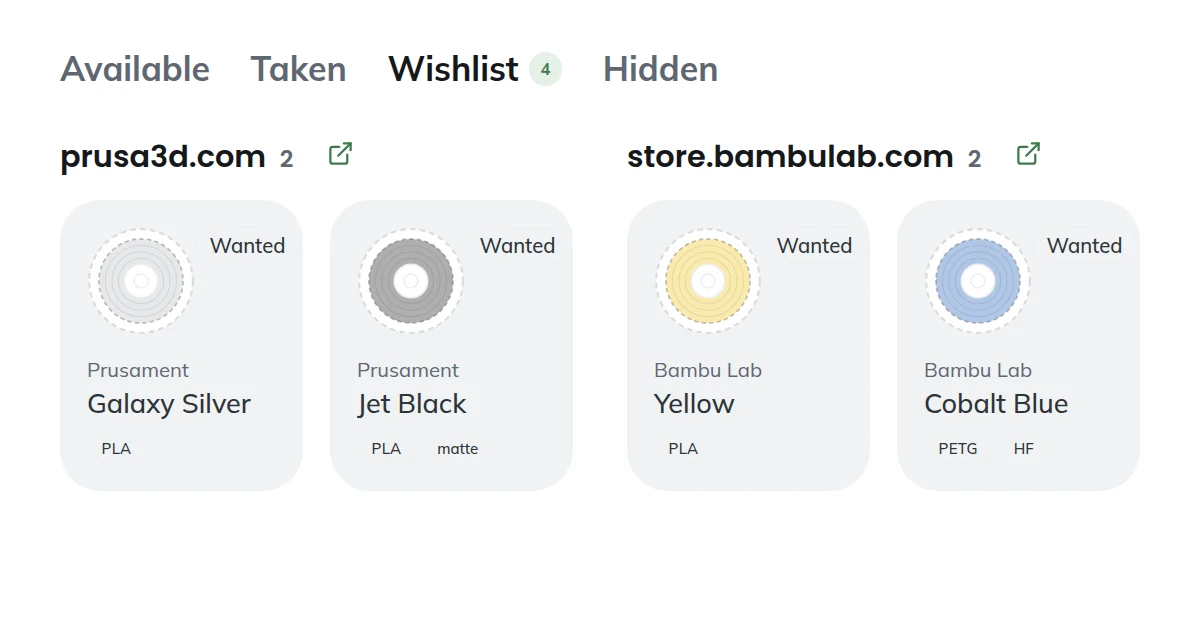
A wishlist item looks like a spool because it is one - the same brand, material and colour card, drawn as a dashed outline so you can tell at a glance it is not on the shelf. Only you can see your wishlist. Nothing on it shows up on shared pages.
Three ways things land on it
It ran out
Open the spool that is empty and tap Ran out. The spool moves from Available to the wishlist in one step, and it keeps its product link, so reordering is a tap, not a search.
When the new spool arrives, tap Got it and it is back in Available, full. The spool goes round in a loop - wanted, available, taken, wanted - instead of being deleted and retyped every time.
A friend has it
Someone on your shared page has a colour you keep borrowing. Open their spool and tap Add to my wishlist. Brand, material, colour and the shop link copy across; their notes stay theirs.
No duplicates. If the same brand, material and colour is already on your wishlist, the app tells you instead of adding it twice.
You just want it
The plain Add to wishlist button opens the same form as adding a spool. Paste a product link and autofill reads the brand, material and colour off the page, exactly as it does for spools you own.
Grouped by shop, because that is how you buy
This is the part built for the moment you actually order. The wishlist is grouped by the shop each product link points to - Prusament together, Bambu Lab together, Filament PM together - biggest basket first, with a link to the shop on each group.
So the restock is: open the wishlist, open the shop with the most items, add them, done. Items without a link sit at the bottom under "No shop link" so they are not forgotten either.
Before it runs out
Since spools have a rough level (full, half, low - more on that here), a spool marked low shows a hint on its page: put it on the wishlist now? One tap copies it across while the old spool stays where it is, so you order the replacement before the last print fails at 90%.
What this is not. It is not an inventory in grams, not a price tracker, and it does not talk to shops. It is a list you fill from things you already look at, in the place you already look at them.
Open your catalogue and try the Wishlist tab - or sign up if you are new here.