
Your own car model without CAD - draw it from the side and print it
You want a model of one particular car - the one parked outside your house, or a classic nobody has modelled yet. It is not on Printables, an AI generator gets the rough shape but melts the edges and windows, and in Fusion it takes several evenings.
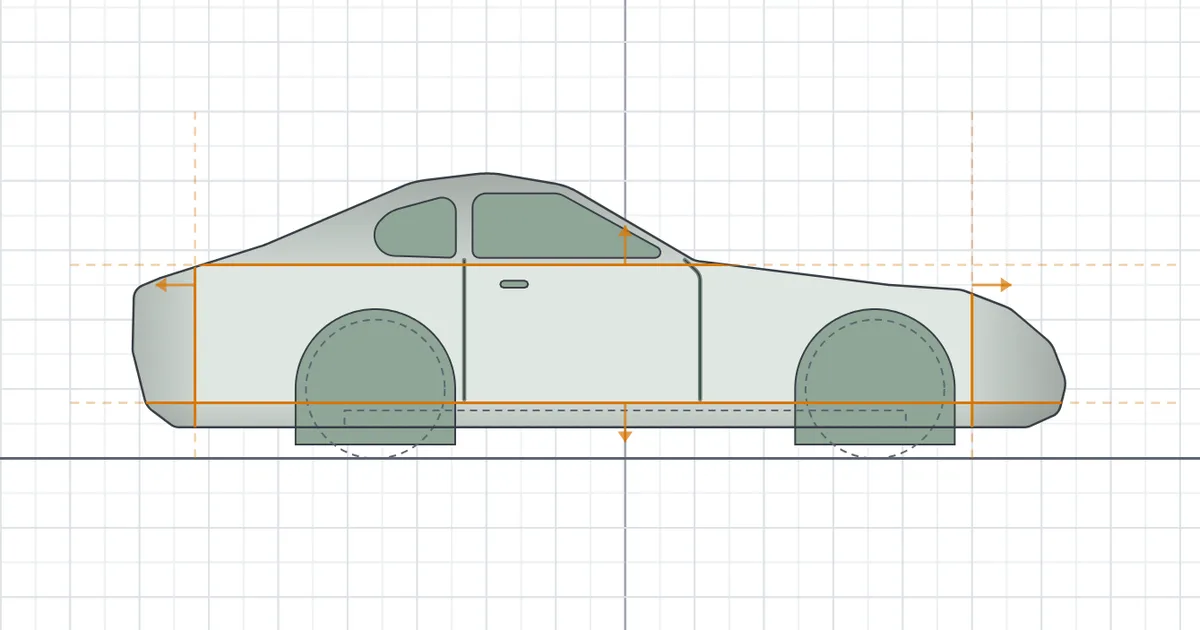
Yet from the side a car is mostly a silhouette. Windows, doors and lights are areas cut into the body, and the edges that turn a box into a car are straight lines past which the surface leans away.
In the car designer you draw exactly that - the silhouette, the lines and the details - and it builds a body that prints.
1. Start from a template, or a photo
The File menu has New design… with two groups of templates. The kinds of car - hatchback, sedan, SUV, pickup, sports car and van - are drawn for the chassis tool's default wheels. The real cars - Octavia, Beetle, Defender, 911 and Cybertruck - are scaled to a 72 mm wheelbase and stand on the wheels they really have.
A template is an ordinary design. Every point, line and detail can be moved, deleted or added to.
Drawing from a reference? Every view - side, front, rear and top - has its own Picture to trace. Line up fits it with two taps: on the wheels' middles from the side, where the tyres meet the ground from the front and rear, on the car's tips from above.

The photo stays with you. The picture is kept in your browser only and never goes into the model or the downloaded file.
2. The silhouette
It all starts from one closed outline of the car from the side, pulled out to the car's full width. Points snap to a grid and every corner has its own rounding. A tap on a dashed edge adds a point, and a point's coordinates can be typed in.

3. Chamfers
The Chamfer tool draws a straight line, and past it the surface leans away at the angle you set, sharp or rounded - like a chamfer in CAD. From the side that makes a cabin narrower than the body, from the front the corners of the grille, from above a rounded roof edge or a bonnet sloping down to the nose.
A line right across the car works everywhere, a shorter one only along itself. From the front, the rear and above a chamfer can mirror onto the car's other half, so you draw one side only.

A domed roof
A chamfer from above starts from the plane through the line's ends, so a domed roof rounds only at its crown. With Follow the surface on, the chamfer keeps to the surface's height all along the line and runs out smoothly at its ends. That is how the Beetle and the 911 get their round roofs.

4. Details
Windows, doors, lights or a grille are areas and lines you cut into the body, add onto it, or cut right through. You draw them in the view you see them in: a window from the side, lights from the front, a sunroof from above.
A detail can stand In a row - grille bars, vent slots. Its depth is measured from the body or from the details below it, so a window sits right even in a cut-in side. Any of its walls slopes with a tap on the dot beside it.

Lettering is a detail of its own, cut in or raised, in Poppins or Atkinson Hyperlegible. From the side it reads the right way on both sides of the car.
Small letters run together. Below 4 mm of letter height the outlines merge in print, and the designer says so before you print.
5. The print check
The car prints lying on its side, and the print check reads the finished model. Red faces hang in the air, blue ones are bridges. A bridge longer than 20 mm sags in print, and the note under the board says so with its length.
You set the steepest overhang that prints (60° by default). A side chamfer on the bed side then needs at least 30 degrees and only a little rounding, or its edge starts over air - the panel offers both values. A cut that breaks right through the body is named in the notes, and Show takes you to it.

6. In two halves
When a car needs more than prints on its side - wings wider than the body, mirrors, a round cabin - switch Printing to In two halves. The car is cut along its middle and each half prints lying on its cut, so neither side is on the bed.
Pins of 1.75 mm filament, 10 mm long, line the halves up, and the designer drills the holes for them. Across the templates the bridges drop from 377-1846 mm² on the side to 17-193 mm² in halves, with nothing hanging.

7. Download, or add the chassis
The body downloads as STL or 3MF, lying the way it prints. Save a design in progress with File, Save to a file, and open it again whenever you like.
Add the chassis hands the body to the chassis tool together with the wheels it was drawn round. There it gets its pocket and wheel wells, and you get a chassis with the wheels printed in place on their axles - the chassis article explains how it works. Back to the car design takes you back.
What it cannot do yet
The car designer is a beta and has a few limits:
- Outlines are straight segments with rounded corners, not free curves. A smooth arc is built from several points and their rounding.
- The shape comes from views - silhouette, chamfers and details. Free-form surface modelling, as in a sculpting program, is not there.
- It draws no wheels: the car is drawn round the chassis tool's wheels, and the chassis tool adds them.
Open the car designer and start from a template - move a few points, add a detail and download your first body.